Hi every body, i m facing a serious situation about 1 month ago
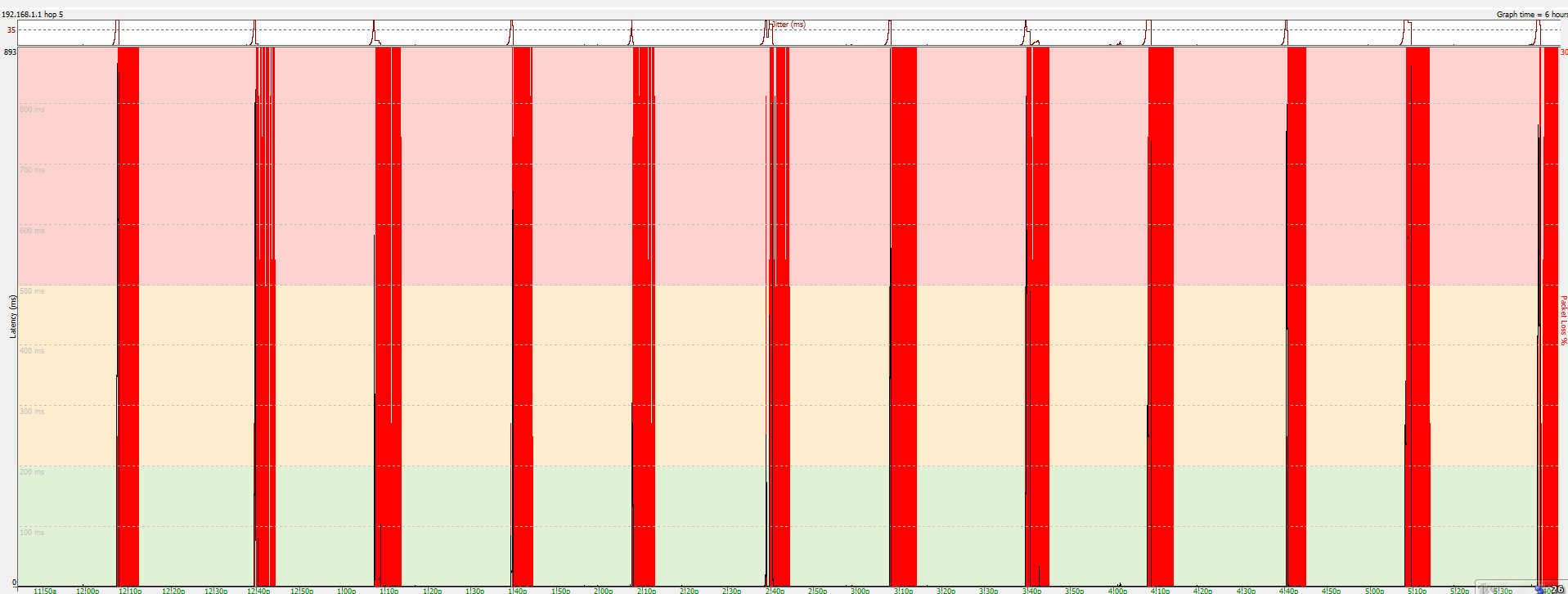
When i open bitcomet , download or do nothing , my internet has packet loss every 30 minutes , 5 minutes each time
Does every body face the problem like me, i just discovered the root cause by bitcomet yesterday, turn it off then every thing is OK
I have a cable connect to my modem 192.168.1.1 and of couse 8.8.8.8 , and i don t know why it happen , i never see ping from PC to modem have packet loss
Here is my ping monitor from my PC to 192.168.1.1, my bitcomet version is 1.74
Please help me to solve this problem !
PS : i just found when i use a VPN connection , the packet loss to 8.8.8.8 is disappear
/monthly_2021_02/image.png.e5103b44483376c19f4523ba10607943.png" data-fileid="3229" data-fileext="png" rel="">
Try setting your computer IP to a fixed value (not auto) such as 192.168.1.12 and make sure that BC has a fixed port value corresponding to one set on the router for that poarticular intranet IP.
Don't use just one DNS - use both 8.8.8.8 and 8.8.4.4. Sometimes you may need to use 192.168.1 as primary DNS with 8.8.8.8 as secondary, but 8.8.4.4 is also needed. Try it both ways

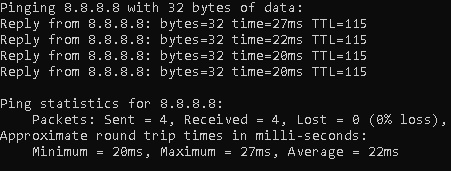
That set of red lines tells me absolutely nothing. If you want a ping value, open a command prompt and type 'ping 192.168.1.1' (without quotes) and also try a ping to your isp (do NOT post that IP here or anywhere else)
	5 hours ago, Rhubarb said:


		Try setting your computer IP to a fixed value (not auto) such as 192.168.1.12 and make sure that BC has a fixed port value corresponding to one set on the router for that poarticular intranet IP.


		Don't use just one DNS - use both 8.8.8.8 and 8.8.4.4. Sometimes you may need to use 192.168.1 as primary DNS with 8.8.8.8 as secondary, but 8.8.4.4 is also needed. Try it both ways


		That set of red lines tells me absolutely nothing. If you want a ping value, open a command prompt and type 'ping 192.168.1.1' (without quotes) and also try a ping to your isp (do NOT post that IP here or anywhere else)


hi , red lines is time when packet loss happen, it happen every 30 mins,  i can not give you a ping result, i capture it with pingplotter ( ping monitor program )

Just set IP to fixd value but it still have packet loss , when i turn off BC, packet loss is disappear after some minutes  , i thing BC trigger something

Here is my video for easily imagine 😄
Type 'ping 192.168.1.1' and just note the response (it will run four times)

Do the same for 8.8.8.8 and 8.8.4.4

Packet loss is when you receive corrupt data - it's nothing to do with bitcomet but more to a defective packet (data corrupted or paclen was incorrect)

It should be obvious really that you will only have packet loss when you receive packets - if you aren't sending or receiving packets then you simply won't have any packets to lose
	27 minutes ago, Rhubarb said:


		Open a command prompt


		Type 'ping 192.168.1.1' and just note the response (it will run four times)


		Do the same for 8.8.8.8 and 8.8.4.4


		Packet loss is when you receive corrupt data - it's nothing to do with bitcomet but more to a defective packet (data corrupted or paclen was incorrect)


		It should be obvious really that you will only have packet loss when you receive packets - if you aren't sending or receiving packets then you simply won't have any packets to lose


i use ping every time I use my PC , so packet is send & receive  frequently , but can you suggest me to check something with BC because every time I open BC, packet loss happen immediately

pls see my video
12 hours ago, Rhubarb said:
If you are unwilling to tell me the results of a ping in COMMAND PROMPT, there's nothing further I can do
/monthly_2021_02/ping.jpg.052f0bc6230060f4a84778464105d216.jpg" data-fileid="3234" data-fileext="jpg" rel="">
sorry youtube delete my video , here is every i capture on my screen , include ping result ,pls take a look at this
Your computer is only connecting intermittently to the router.
It's possible that you are not setting the gateway correctly

Try this in network settings

IP address 192.168.1.21

Netmask 255.255.255.0

Default Gateway 192.168.1.1

Use the following DNS server addresses

192.168.1.1

8.8.8.8

in advanced add 8.8.4.4

Open your router settimgs in a browser (http://192.168.1.1) and set it for post number (any five figure number you like) and assign that to 192.168.1.21 for both TCP and UDP

In bitcomet set your port number to match the one in the router
	18 minutes ago, Rhubarb said:


		Your computer is only connecting intermittently to the router.


		It's possible that you are not setting the gateway correctly


		Try this in network settings


		IP address 192.168.1.21


		Netmask 255.255.255.0


		Default Gateway 192.168.1.1


		Use the following DNS server addresses


		192.168.1.1


		8.8.8.8


		in advanced add 8.8.4.4


		Open your router settimgs in a browser (http://192.168.1.1) and set it for post number (any five figure number you like) and assign that to 192.168.1.21 for both TCP and UDP


		In bitcomet set your port number to match the one in the router


ok thanks, i ll give i a try
Amarsi - that sounds as if you are losing the connection to the trackers. It’s obviously not a common issue (or this thread would be full of ‘me too’ posts).
Now, whether the problem is between the computer and router or the router and the trackers, I honestly can't say. It could be anything, including out of date network drivers, router firmware or even your ISP interfering (mine used to do that at one time and slowed down any transfers if they felt I was using too much bandwidth). It could even be a windows issue.

As I said, it's unlikely to be BC itself or we would have a huge number of posts on the subject - so far it's only two.
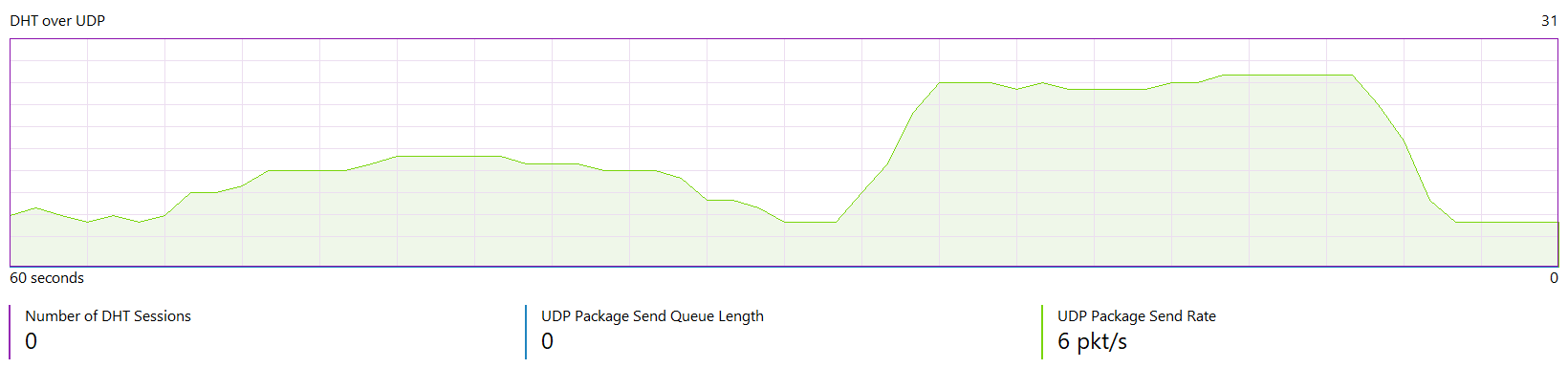
It’s definitely problem with DHT, since i updated from 1.64 to 1.74. ( Never had this problem before, on the older version )
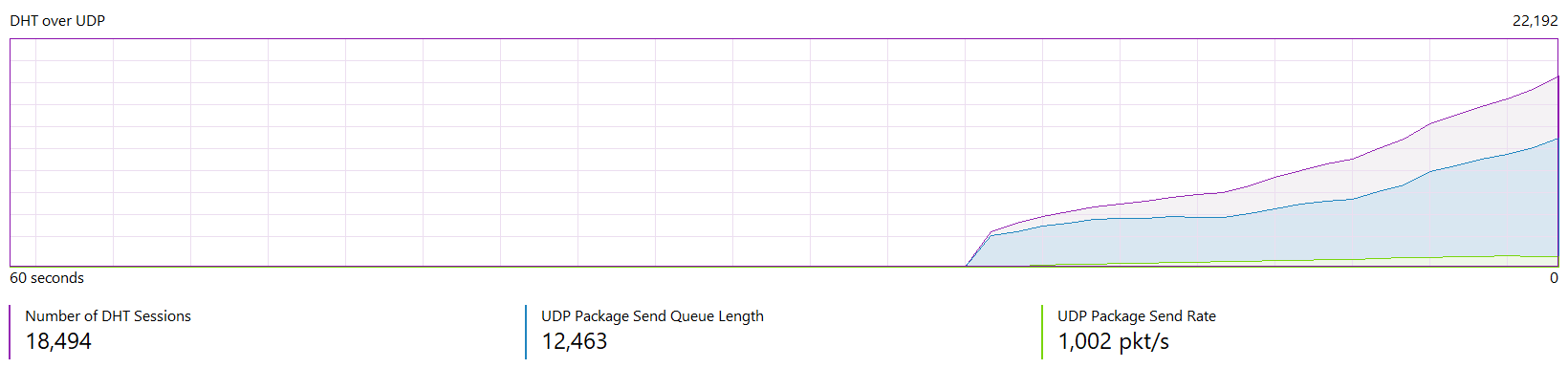
Whenever u start up bitcomet it get's bombarded with thousands of connections and this gets fixed once u disable DHT in options.

Hope you can fix this issue in 1.75
The default value for DHT is, if I recall, 1,000 magnet files. If you’re downloading more than that, there’s something wrong with your setup. Try deleting all the entries in Torrent Exchange and see if that improves things
/monthly_2021_02/BitComet_2021-02-26_02-10-50.png.447485949311e5fb9e7294d5b840970e.png" rel="">
I have to wait around 5 minutes until all sessions are gone, have no idea what is causing it./monthly_2021_02/BitComet_2021-02-26_02-15-27.png.c42bfd6af78beb33402f57be9973eb36.png" rel=""> This
Everytime i start bitcomet with DHT enabled, it has lot of sessions.
And yes, I removed all entries in torrent exchange and also history. That didn't fix it. ( The only thing that fixes it is to disable DHT and when U launch bitcomet it has 0 sessions )

1 hour ago, Rhubarb said:
The default value for DHT is, if I recall, 1,000 magnet files. If you're downloading more than that, there's something wrong with your setup. Try deleting all the entries in Torrent Exchange and see if that improves things
Default settings is set to 1000 magnet files, idk what really is causing this.
When i launch bitcomet it takes like 3-5 seconds to boot up, it was never like that on the older version.

Using this version, i updated it directly from the client.