Bitcomet stops downloading files in preview mode

Sometimes I download multi-file (video) torrents, and very often, especially when the file is in the middle of the list, Bitcomet just won’t start downloading chunks sequentially, even when the speed is high enough (400 to 3000 KiB/s), there is plenty of peers (80+) and the file is half complete. Files at the beginning of the torrent and single-file torrents are usually download step-by-step without any problem. “Preview download mode” is ticked and so is “Optimize download strategy for preview”.

Is this a known bug and is there a known solution to the problem?

Thank you very much for your assistance.

I’m using Bitcomet 1.27 on windows 7.

s1.png

s2.png

Actually your harming your efficiency by downloading this way. The most efficient way to download is to take the pieces that are available, when available. If you ignore pieces you don’t want till later, they may be rare when you finally decide you want them.

Also, bittorrent does not download sequentially, so there is no bug. When you use the preview stratigy, it gets the first and last parts of a video file and then tries to get a short segment somewhere that is long enough to play to give you a preview of quality.

I highly recommend you avoid this if you plan on downloading the file regardless, as it’s only a useful tool if your using it to determine if you should let the download complete, or abort.

The UnUsual Suspect, please read the section “How to enable the preview of the whole file?”

I’m not harming any efficiency, because there are many seeds on the torrents i download, and even given that many ban me the speed doesn’t fall down as it’s limited by my ISP not peer count.

Bittorrent does not download sequentially, and it doesn’t download or do anything else at all because it’s a protocol. Bitcomet, however, does (agan, see wiki).

BitComet uses Bittorrent protocol to download torrents. That protocol is used to find peers best suited to trade with you. In order to get the best trading partners you want to arrange the best trades, where you send and receive data.

If your selective about what data you want, then your harming your efficiency, not only of your own, but the entire swarm.

By the way, did you read that article you linked from our wiki??? specifically this part…

However, be advised that this will have, most probably, a negative impact on the downloading speed for that task.

Which is exactly what I told you, but I also pointed out that it not only effects your efficiency, but the entire swarm.

To answer your first question, this is not a known bug.

Does this happen to you only on multiple-file torrents?

Does the size of the torrent have any bearing in the occurrence of the issue or not?

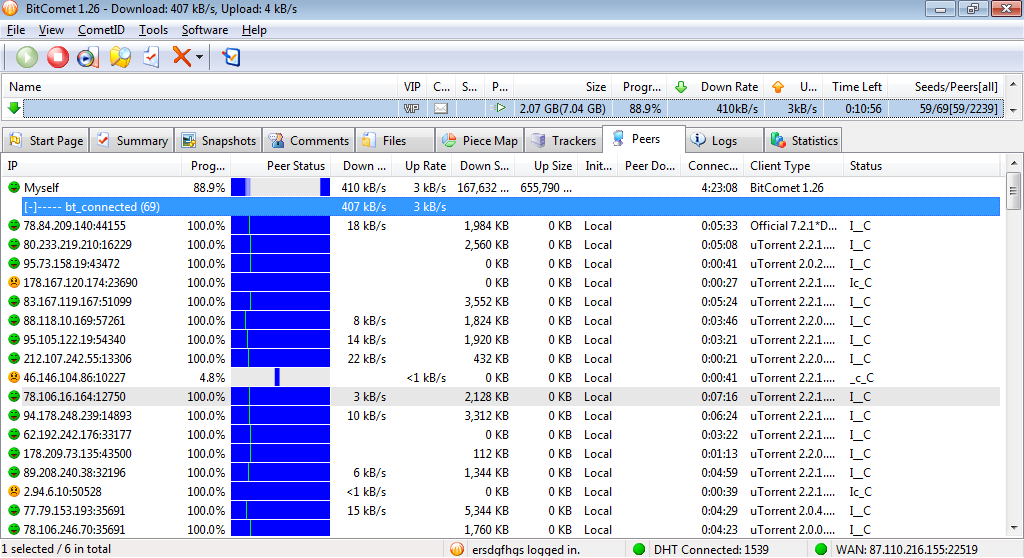
While BC downloads other pieces that the next one in the sequence, are you actually connected to any seeds? If yes check the peers tab and watch from which peers you are downloading and which ones are choking you.

Perhaps a screenshot of the Pieces tab showing what you mean would be of use. However note that if BC doesn’t find the pieces is requests it may still download other pieces in the meantime in order to make efficient use of the time it spends waiting for peers which can offer it the next pieces in the sequence.

The fact that the torrent has many seeders, doesn’t necessarily grant you the pieces you want; you may be still be downloading most of the pieces at that moment from peers and the seeds you’re connected to may be choking you.

Does this happen to you only on multiple-file torrents?

So far I haven’t experienced the error on single-file torrent, but I don’t download much of them lately and I don’t turn the preview thing always.

Does the size of the torrent have any bearing in the occurrence of the issue or not?

I don’t know.

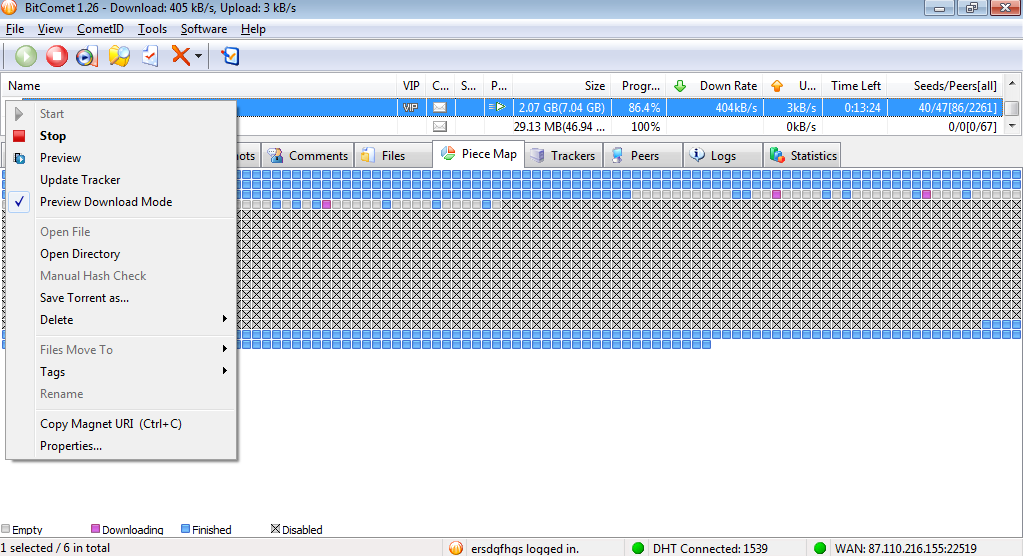
I’m attaching two screen-shots here for your amusement; I hope this will help to identify the problem.

/monthly_05_2011/post-64079-13042660245996.png" rel=“”>

/monthly_05_2011/post-64079-1304266069288.png" rel=“”>

Well, so far we haven’t established yet that there IS a problem. The screenshots you posted are not very clearly indicating that situation either, since most of the files for that torrent are disabled.

If you want to present proof of a bug you’ll have to do that with torrent s that don’t have most of the pieces disabled and also you’ll have to be able to reproduce that in more than one torrent.

As I was explaining above, this option doesn’t GRANT you absolute sequential download order for pieces (BitTorrent protocol just wasn’t designed for that) but a best-effort behavior from the client’s part.

It’s very possible that the scattered pieces which can be seen in your screenshot may have been downloaded at moments when all the peers/seeds which may have served the next sequential pieces to your client were choking you. So you client was faced with the choice of either sitting idle waiting for any peer to serve it the next sequential piece or taking any other piece which was available. In that case, the logical and most productive choice is the latter, hence the few scattered pieces you can see.

I’m not denying 100% the possibility of a bug, just saying that what you presented may have very natural causes. In order to prove a bug of this type you need to watch closely the Piece Map and *Peers *tab during the whole download. If while the seeds connected to you are NOT choking you, you still download ONLY scattered pieces and no sequential ones, then and only then can there be talk of a bug.

I hope you can understand now why this is a rather time consuming operation and not a very easy to carry out one either.

Seems to me that piece graph shows that it’s doing it’s job exactly as planned. It’s targeting only the next sequential 50-100 pieces and getting them in the order they become available. This doesn’t look like random scattered “fill” while waiting. If that was the case, it would be across the entire field, not only the immediately adjacent group of pieces. Even if it was random fill, that too would be normal and expected.

edit: I see the large block of disabled pieces, didn’t notice that at first.

Well, being I hate this option, not only is it trying to force bittorrent to do something it’s not disigned to do, it’s also leading people to believe it was intended for this and making the bitcomet userbase poorly educated resulting in poor peers, which reflects on bitcomet as a whole.

I’ll just stay out of this topic I think.

In addition to the afrorementioned torrent, which is season 3 of some TV series, I’ve tried to play also with season 2, a similar torrent with about the same number of files, file size and even seeds. So:

[s3] This is what happened when I enabled all the rest files of the torrent I spoke about earlier;

[s3] This is what happened when I deleted all the files of the said torrrent and tried donwloading a single file – now it worked! (As I’ve pointed, it didn’t work before) I believe the difference between this two states of a single torrent clearly shows that something has gone wrong.

[s2] This is what happend when I started downoading season 2–a very similar torrent;

[s2] This is how it progressed and

[s2] What was it like in the end… It somewhat works.. Or not?

[s2] A single file downloads in the same way as in [s3]

The peers tab looks either like this or like that, depending on the LT Seeds option.

I’m guessing what bitcomet is doing is treating the entire torrent like it was one video, instead of treating each file separately. However in this screenshot, I’m guessing the pattern of small blocks of data are beginning and endings of each file, so that would lead me to believe it is treating each file as a separate video so it can optimize for preview.

http://dl.dropbox.com/u/21637985/bitcomet_shots/2-0.png

I’m not sure you got my explanation from above.

Static screenshots can’t constitute much proof of anything in this matter, from a logical standpoint. If at the moments when those scattered pieces were downloaded BC didn’t have a better choice available, then it made the best choice possible by downloading them instead of standing idle.

While to you it may seem that the composition and behavior of a torrent swarm is something stable, you couldn’t be farther from the truth. Think of the high entropy of a heated gas in the physics/chemistry lessons and you’ll get a closer picture of the dynamics inside a torrent swarm.

You can’t compare the behavior of your client in two different moments in time because you’ll never be able to reproduce the same parameters twice; you’ll always be comparing, more or less, apples to pineapples.

Just a few points for you to digest:

how many peers did your client connect/disconnect per minute in each instance?

how many of the connected peers were seeds or peers?

how many of the connected peers that were seeds were choking your client and for how long?

how many of the connected peers that weren’t seeds were not choking your client and for how long?

how many of the connected peers that weren’t seeds and weren’t choking your client did have the next sequential piece your client was looking for?

These are just a few parameters of many that impact the behavior of your client and of all the other peers each in its own right, and some of which may change even several times a second!

That’s why static screenshots can’t be of any use to prove a point in this particular matter.

Moreover, take note that this feature was introduced when torrents with dozens of video files were not an ordinary thing, so it may even not be heavily optimized for doing that but mostly for single video torrents. Nonetheless it seems to take into account the multiple video files into the torrent, as your screenshots show.

Add to that the fact that BitComet is doing its best to pull out of thin air a feature for which no provision exists in the BitTorrent protocol.

So, this should really be regarded as a “best-effort” feature not as something that will grant you streaming-like reliability.

As I said previously, if something still seems fishy to you, you’ll need to do real-time monitoring of this feature comparing the pieces which are being downloaded against the peers which are actively serving them.
First of all, thank you for your prompt and huge reply. Second, there is a this book, ‘Foundation’ by Asimov… Well, not that I believe that it’s possible to learn about the future by calculating statistical probabilities, but gas movement can be easily predicted on a large scale. I suppose this is what chaos theory is about.

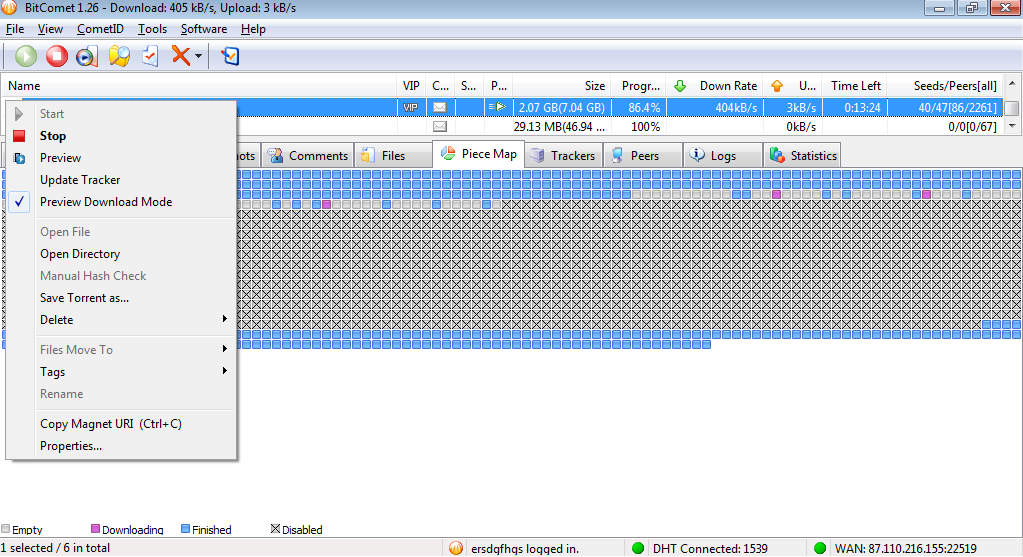
The screenshots I posted are merely visualizations of my words which only serve the function of proving that I’m (hopefully) not a complete idiot. Tbh I don’t really know how do I learn “how many peers did my client connect/disconnect per minute in each instance”, but what I do know is that I’ve spent a good time looking at “Piece Map” tab (as I’ve got two monitors and can watch a movie on another) and I’ve seen enough to say that sometimes restarting BC helps and sometimes choosing another file helps, and in ALL cases the difference between “it’s working” and “it’s not” is so huge that I can assure you that there has been no state (not taking one of the mentioned shots in account) when BC “downloaded SOME of the piece sequentially while downloading some random pieces”. In other words, you are saying that exactly 100% of seeds I want to download from in sequence choke me. If I get the things right, that is.

If restarting BC or choosing the next file (a matter of minute!) in a swarm of hundreds of seeds really can make such a difference, then I don’t have any more questions. I know that bittorrent protocol doesn’t implement streaming (yet?), but when BC succeeds at it, it works flawlessly enough to make me think that when it doesn’t, it’s a bug.

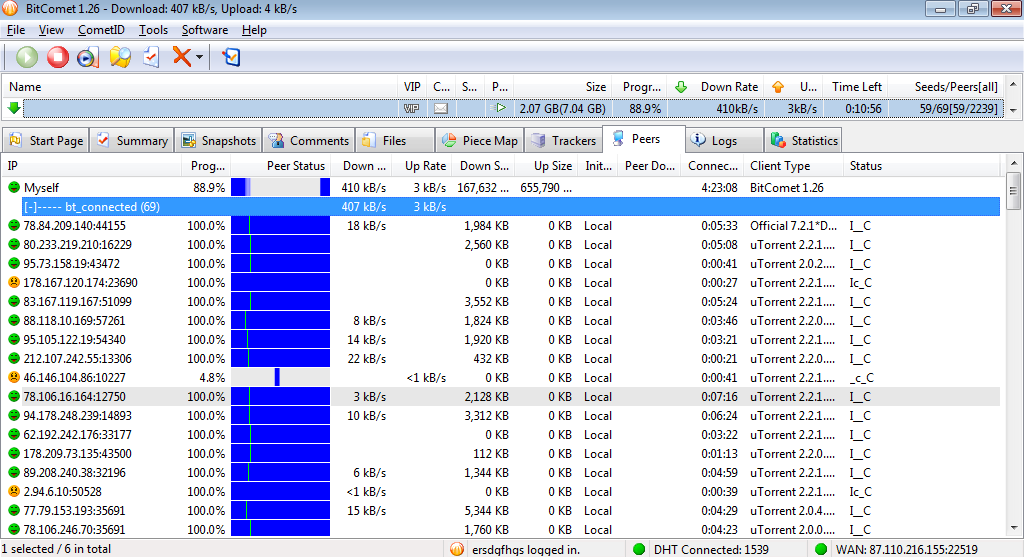
To answer the points I can (as evident from the screenshots):

how many of the connected peers were seeds or peers? about 60 of 70 or so
how many of the connected peers that were seeds were choking your client and for how long? about 5 / don’t know. Almost all of the peers are I__C

And.. why are non-seeds so important?

P.S. Sorry for my bad English, it’s late and my head aches. >__>

If he thinks his head hurts, he should feel mine after trying to follow all this lol

Well, all those questions weren’t written above for you to answer punctually, just to make you understand that they’re parameters which affect how your client behaves in each split second.

The non-seeds are important because if out of all the peers to which you’re connected, the ones which ARE seeds are choking your at any point but you have some non-seeds not choking you, then you’re left to trade with them for the moment being (be that a few seconds or several minutes). During those specific moments, your client can’t afford itself to be so “picky” since peers which are not seeds don’t hold all the pieces and may very well NOT have the next sequential pieces you need.

And yes, from a logical standpoint restarting the torrent might change the situation due to the optimistic unchoke feature of BitTorrent; thus seeds which were choking you may grant you a download slot for a while, when you reconnect to them.

Again, I’m not advocating that there isn’t a bug, just saying that you didn’t present enough solid proof nor explained in detail how you tested (not until your last post, at least).

So, for the 3rd and last time I’ll reiterate what I told you before:

You can get pieces from seeds and non-seeds. Since only seeds hold all the pieces they will be the only ones who can aid you in proving a bug.

Therefore, if while connected to seeds, you can see at least a couple of them in the Peers tab actively uploading to you fast enough to saturate your download bandwidth and by switching back and forth between the Peers tab and Piece Map tab, you can actually confirm that BC is downloading only scattered pieces and no sequential ones, only then we could talk about a bug.

Understand that in order for us to forward a bug report to the dev team, one essential condition is that the bug can be clearly described and preferably also reproducible.

Since we don’t see what you see we have to eliminate any possibility of misinterpretation and actually collect some hard evidence in the process.

Nevermind all the dialogue.

Hash checking fixes it.

Actually I got the exact same problem as ersdgfhgs. I want to be able to watch the video as it’s being downloaded. And this is what “Preview Download Mode” is intended for (from my understanding). As was mentioned above it works great for single-file torrents. I have the blue line from the Summary tab clearly advancing from left to right. It also works the same way when I download the first file in a torrent. BUT when I enable downloading of another file from the same torrent (by switching it’s priority from Disabled to Normal or High) the blue line (it’s rightmost part) is just scattered. And I can’t watch the movie :frowning:

Oh, ersdgfhgs, you are a genius!!! I tried without any hope and… hash checking really helped! Though it’s not very fast but it’s definitely worth it. I’d like to plus you but unfortunately I can’t (you have reached your quota of positive votes for the day).

To greywizard and support staff, well, it’s clearly a bug. Instead of spreading a hot brainstorming about abstract chokes, seeds and peers you could’ve just taken any torrent with, say, three files in a single folder (8 gb each if it matters), set checkboxes to download the third file, enabled preview mode and seen what happens. It takes just five minutes! I’m sure you’d get the results we got.

To developers, if you ever read this, please pay attention to this issue. Two people confirmed it without any problems. ersdgfhgs even provided a workaround that may help you identify the reason for this strange behavior. BitComet gives me the fastest download speed of all known torrent clients. It also has so many useful functions, that’s why I started using it in the first place. It would be great to see you supporting them too.

Sincerely yours,

User 239.

I think the problem is the fact that your disabling/enabling files after the download process has begun. This complicates things and must make bitcomet recalculate the entire process.

For one thing, preview mode is forcing a torrent to do something unnatural by refusing the most available pieces and only taking certain ones it wants. Using the file selecting options complicates this even more, so your becoming a very selective peer, this increases the overhead greatly and other peers will have a difficult time trading with you.

In other words, you can’t expect this option to work if you change the parameters after you begin the task.

Also, you would be doing everyone a favor (including yourself) if you left the torrent to download normally.

ps. The only way to make bitcomet do as you expect it to would be to have it force a rehash so the task can be recalculated anytime you make changes, but these forced rehashes are unwanted by 99% of users.

The UnUsual Suspect, thank you very much for the explanation. Well, now it makes sense to me and I see the problem is quite fundamental.

Also, you would be doing everyone a favor (including yourself) if you left the torrent to download normally.

Do you mean I shouldn’t use preview mode? This is the primary reason I’ve switched from uTorrent (and of course speed). Anyway who wouldn’t be tempted by the possibility to click one button and start enjoying their favorite movie immediately without waiting for a good hour to have it downloaded? :slight_smile: I think it might even be one of your ‘killer’ features. I can’t tell for other users but with this mode enabled I didn’t have any problem with speed. It was still limited by my ISP (10 mbit).

ps. The only way to make bitcomet do as you expect it to would be to have it force a rehash so the task can be recalculated anytime you make changes, but these forced rehashes are unwanted by 99% of users.

Well, I agree because it’s not a very fast procedure and not so many users would want it to be executed without their attention. But maybe a small popup could help. Similar to the one that suggests you to do a re-check after some files were modified by an external program. It would just save users like me from being confused.

Thanks again, manual re-check worked great for me.

Our FAQ files does warn that downloading in preview order harms efficiency. You’re welcome to use the feature, but it can slow your downloads, even considerably in some cases, but if there is enough sources that the only limit is your isp imposed bandwidth cap, then it won’t make any difference to you, but it’s still less efficient for others.

Torrents are distributed in tiny pieces, and the protocol is designed to get you the ones that are most available at the time. To do this you only need to connect to a few peers and take what they have to offer, then towards the end you become fussy, because you only need a few specific pieces, so you have to use a lot of overhead connecting to many peers until you find these pieces.

With preview mode, your constantly “fussy”, unwilling to take what’s offered and searching for peers that have only the pieces you insist on. Obviously, this is not noticeable to you in some cases, but imagine if you want piece 10 and every peer offers you piece 1000, but you decline, meanwhile your preview stops because it cannot continue, so you wait, have a meal and return. You can now continue because you now have piece 10, but later in the movie it halts yet again because piece 1000 is now rare and cannot be found.

With regular settings this task would already have that piece and the download would most likely be complete, but now you have to wait until you find peers offering this piece again.

Note: This could happen hundreds of time during the process, perhaps more on a large torrent.

I’m not saying not to use it, but if you can, it would be best to let the client download the pieces offered by the swarm and watch when complete, but if you are that eager to watch, then the option can be handy.

By the way, I read a press release about utorrents new beta version supporting “streaming”, like it was a revolutionary option. It’s exactly what bitcomet has offered for years, we just call it “preview mode”.