Just wanted to say that Comet Player is the exact player I’ve been looking for. I used to use Windows Media Player because it was so easy to save a playlist, let alone find it again. But the more they updated it, the more complicated it got.
All I needed was a way to play an album without too much hassle, and Comet Player certainly fulfills that need.
I only have a few sugestions:
I use the music website last.fm very often, and I would love to see Comet Player with a last.fm plugin, so my mp3s would get “scrobbled” on to my last.fm profile.
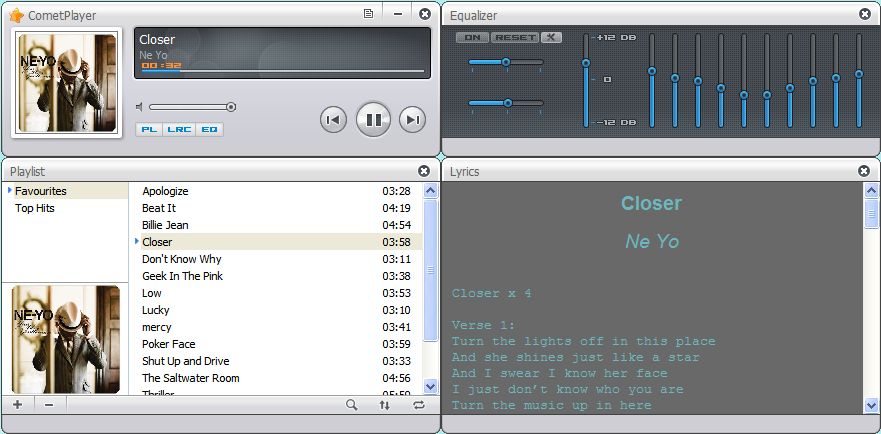
My last, and very minor suggestion is that one would be able to stretch the playlist box as wide as one wishes, just like you can with the box where the actual songs are in. When I save playlists it’s both artist name and album, for example “Mouth of the Architect - Quietly”, but Comet Player’s playlist box is so narrow that I sometimes have to go on a hunch when I click on an album/playlist as I can only see the artist name.
Anywho, kudos for making the best and easiest player ever, and I hope my suggestions makes sense
Hi Claus, I’m so glad to see you like CometPlayer. :lol:
Regard to your suggestions, the “plugin” part will be reported to the development team and they’ll make decision on it.
Actually you can stretch the playlist panel, just close/move the panel next to it (which should be the lyrics panel), then you’ll be able to stretch it.
Vasy, the “multimedia keyboard” you mentioned, are they the Play/Pause, volume, stop and other keys on the keyboard? Sorry if I didn’t describe it clearly… Anyway I’ll report this to the team if I got them right. =)
I just noticed the Comet Player whenever I tried to launch a mp3 the other day. I will admit, this is nice program. However, I have a few questions about it… First, where did the program come from? I don’t recall downloading it unless it was in the MPC Star 4.6 installation and I missed it. Second, where are the shortcuts to launch it? They didn’t install with MPC Star. At the moment, I just let the mp3 launch the player via double-click. Finally, where is the default installation directory so I can make some temporary shortcuts to it? Thanks in advance. Awesome player, by the way. I love the fact that it uses like less then 1% of my processor all the time. Much better then greedy Windows Media Player and iTunes. Excellent job. Now, if we can just get it to burn CDs and convert files to mp3…
CometPlayer is contained in MPCStar’s installation package, and it’s installed under the directory of MPCStar, its shortcut should be there as well. Version 4.7 has improved the shortcut issue, so after installing MPCStar4.7, the shortcut of CometPlayer will appear on the desktop and start menu.
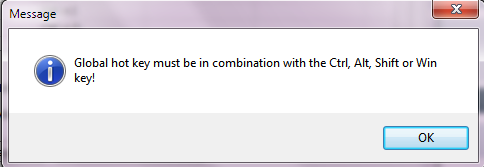
Yes, I know they can be set as 1st HotKey and** 2nd HotKey** but they cannot be set as a Global HotKey because this little message appears when I try to:
You’re right Vasy, the multimedia keys cannot be set as Global hotkeys, I’ll talk to the team leader about this, and see if he will include adding this feature into the development plan.
Thank you for your response, Lucy. My MPC Star is currently not up-to-date with the current release, so I will have to get on that to fix my shortcuts.
I have a couple suggestions for the player…
Can you see about adding an option to automatically clear the previous playlist whenever you double-click to open another file or group of files?
An option to keep the player hidden in the background when you double-click to add and play files would be appreciated.
Can we possibly see about an option to cue a file instead of instantly playing it unless nothing is playing or the player isn’t open?
Keep up the awesome work. I am officially a CometPlayer fan.
Are you sure? I have V0.4 and if I have another active window (for example, the browser) over cometplayer the multimedia keys don’t work. They work only when the active window is cometplayer.
Another request, if I may: A controllable realtime “translation” or “upmix” or “speaker fill” (or like the “matrix” button on some sound systems) from stereo to quadraphonic or 5.1 or 7.1 etc.. I.e. I’d like to hear a stereo sound file in all 5 of my speakers with equal volume. If it can be done.



 :unsure: