I just installed a copy of Windows & Ultimate over an RC install set to expire this month. Of course I had to reinstall my software, CometBird being one of them, and I want to import/find my old bookmarks and import them into my new CometBird install. How can I find my bookmarks from my old CometBird installation?
it will be in %appdata% in the CometNetwork/CometBird/Profiles/(you) directory under bookmarks.html
If you want to make things easier in future, you can export your bookmarks, say, to your C:\ directory or to a flash drive, then import later from the same location.
Hello,
Did you regiter a CometPassport account and login your CometMarks plugin at the right bottom of CometBird?

If you did, that will be much easier. Your bookmarks will be stored in our server and you just need to login your account when you finished CometBird installation.
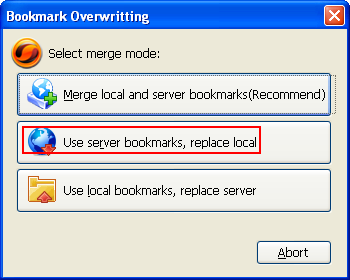
A pop up disloag will ask in what way you want to merge your bookmarks. Choose “Use Sever bookmarks replace local”.
The problem with CometMarks, though, is that you can’t get rid of them. The developers don’t seem to understand, why many people feel that it’s important to be able to delete a CometMarks account and all records of previous bookmarks, at will. I guess this is because of cultural or philosophical differences, but until it’s possible to obliterate a CometMarks account, I am not comfortable with recommending its use.
to me i only use my.xmark.com it s cool. i never lost any single bookmark. i ever use cometmark but not so good. my personal experience 
Another alternative that works just nice is Mozilla Labs’ Weave Browser Sync 1.1, which synchronize not only your bookmarks, but your browsing history and saved password, all thru a secure connection. Last week it got an update which fixes some issues. You can get more info about Weave here.