My computer uses Windows 7 Ultimate sp1 (sometimes with XP sp3) and BitComet v 1.45 with Symantec Endpoint Protection.
In the past using Humax model HG1000R(E)-series router and internet provider said it uses _Public IP address_.

There is no problem at all to do torrenting. Both TCP and UDP ports are all automatically assigned .

Now it changed to Fiber Optic with Fiber optic gateway which provides TV channels and Internet access.

There are Fiber optic home gateway provides Lan connection to a Play box (TV channel) and router for internet access and it is _Private IP address_.

The router is ZTE ZXHN H298A and all my BitComet TCP ports are blocked,  while UDP port is OK (Using direct Lan cable from router to PC)

Most of my torrenting depends on Long Term Seeding and all  _Local_ IP initiation.   No _Remote_ Initiation at all.

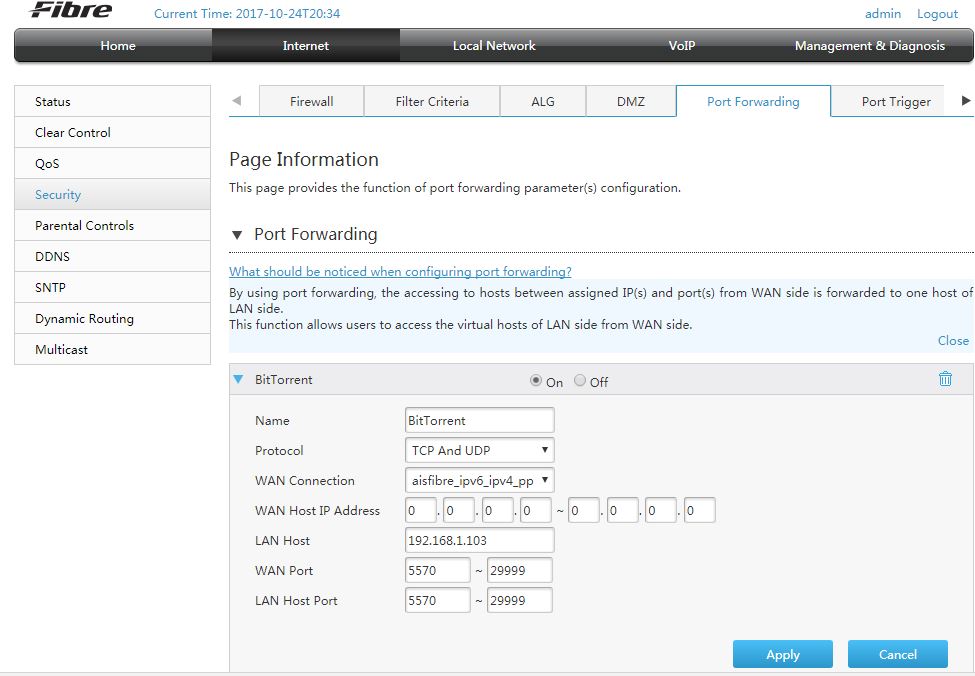
I work with Service provider and follow all setting  around BitComet Wiki information and router setting but still fail to forward the TCP port.

Since this is new to me therefore I need help from members who knows how to setup TCP port forwarding (may be both) on router and/or PC setup.

Note:  I have ghost the Windows and saved  just in case I may do lots of PC setting changes.

Help....Please
I recommend forwarding the port using the "manual" way, instead of their "automatic" (using their Network Utilities), so that you learn what you're doing, in case you want to do the same thing, in the future.
Follow your advice and follow step by step firmly to set static IP but still fail to forward the ports.

Now I am quite sure it has something on the router setting since my router is quite new.

Using  How to Port Forward the ZTE ZXHN H108N Router is no help since my router is ZTE ZXHN H298A

which can not find any info anywhere on the Web.

Continue working on this with all kinds of help

Regards
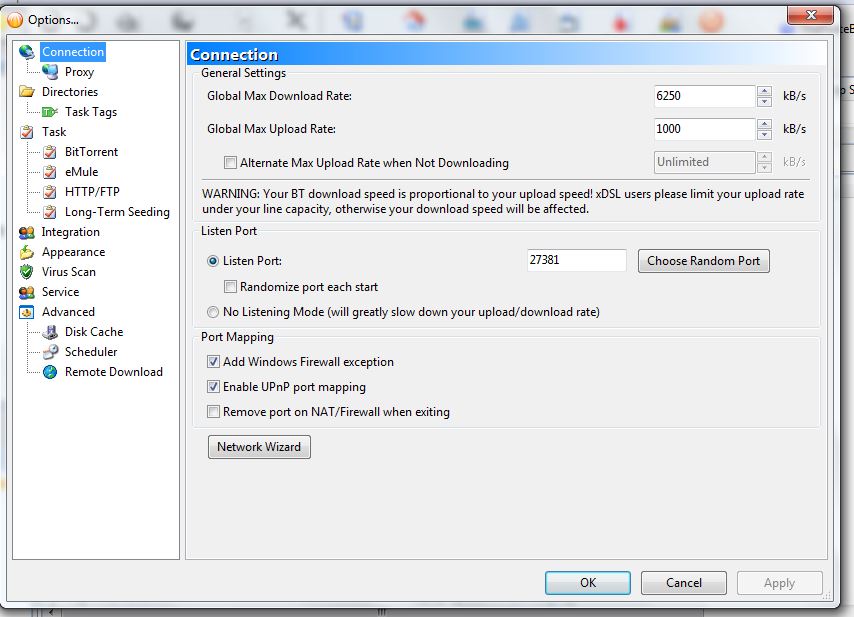
You set a range of ports (personally I prefer them to be higher but that shouldn’t matter. You must set the port (in options > connection) to a value between 5570 and 5579. Also make certain that Windows firewall and UPnP are checked and that randomize port, no listening mode and remove port are unchecked
I did a changed on the router (and reset) and port in BitComet.  Disable Symantec firewall / rules.

It is still no result since I do not see the port in the firewall exception.  I will try again with Symantec uninstall.

Will post again after uninstall the Symantec since it needs to reset the PC.

Suspect nothing from Router....... still working with all help and with my internet provider.

Any suggestion ?
You have set your ports on the router to a block between 5560 and 29999. That’s way too high (for security reasons). Either set it to ONE value or a far smaller block. You should be able to set up one port per application really.
Regarding the firewall. If the Symantec firewall isn't showing the port, the chances are that's where your problem is.

I enjoyed Invictus myself - but what I really recall from that World Cup was the enjoyment of watching Will Carling bouncing along the ground while he was hanging on to Jonah Lomu's leg LOL
I uninstall Symantec and reprogram my router port forwarding with only one port… 27381.
Set all to one port but BitComet is still port block and no 27381 shows in the firewall allow program.

Use port check program and see no port (My IP keep changing).   Unlike when I used fix IP (public IP) everything worked fine with Symantec.

I am still thinking there is the problem on router.  My internet provider also tell me to wait for and update for setting.
set your alternate DNS servers to 8.8.8.8 and 8.8.4.4 (google DNS). Also I think your primary (the router) and gateway should be 192.168.1.101 (according to the first screen dump). However, you can check this by opening a command prompt and typing “ipconfig” - this will show the default gateway and your current LAN IP address
My router IP is different. I have tried those before already and no result.
Note: 115.178.58.26 is for the Play Box.
/monthly_2017_10/59ef6883bfa3e_ipconfig88888844.JPG.d7f0f730933339ff1dcb0e5dcc6e5431.JPG" data-fileid="2806" rel="">
I want to change some parts of my first post to the following:
There are Fiber optic_ home gateway_ box (optic converter) which provides one Lan connection to Router Wan input and the Router provides 4 lan outputs.

One of router lan output connect to_ Android Play box for TV channel_, another lan to _my PC_ and remaining 2 lans unused.
The great majority of private individuals/regular homeowners have what is called a “dynamic” IP address. This simply means that their IP address is “rented/leased” by your ISP to you, for a limited amount of time (usually no more than 24 hours). Of course, since your ISP charges you for more than 24 hours, it changes your IP address periodically so that you are able to obtain a continuous service of more days (usually an entire month).
Now, instead of stopping your service every 24 hours, assigning you a different IP adddress, and re-starting a newly "rented" one, they make this change automatically and periodically, so that you ***_don't_*** notice when your first address is changed to your second one. This also (often) happens when you start/re-start your computer and your router starts to obtain an available IP address.
	Quote


		Is it true in the real world ?


It most certainly is NOT.

Is it possible to forward ports if you have a dynamic IP? Of course you can! Don't let them try to convice you otherwise... (Some ISPs have even been known to try to convince their customers that they ***_needed_*** a Static IP in order to forward ports...This only means that the ISP is trying to trick you into spending a LOT more money than you need to).
	On 11/26/2017 at 5:28 AM, cassie said:


		Is it possible to forward ports if you have a dynamic IP? Of course you can!


Yes,  my internet is Dynamic IP and it changes most daily.   What I can do to forward the TCP port ???

Appreciated for you help.
Your WAN (Wide Area Network) which is your visible presence on the internet is dynamic. However your LAN (Local Area Net) which is the ‘household’ or private internal network isn’t. You set up the LAN to a fixed value in the form of 192.168.1.### (where ### can be any number between 2 and 255). You then set up port forwarding TO that address with port values entered in your router. You then set up Bitcomet to use those port values.
You also need to set up network properties to a fixed IP with the same LAN value as in the router settings with the gateway being 192.168.1.1 and DNS servers to 192.168.1.1, 8.8.8.8 and 8.8.4.4
On 11/26/2017 at 5:28 AM, cassie said:
(Some ISPs have even been known to try to convince their customers that they ***_needed_*** a Static IP in order to forward ports...This only means that the ISP is trying to trick you into spending a LOT more money than you need to).
Greeting happy new year 2018 to all.
Please accept my apologize for late input.
According to you, Cassie, my ISP exactly offers an addition Static IP for some amount of money.
Anyway I have tried according to all of your advices but failed to have the port forwarding.
As per my previous inputs the rounter assigns the Lan IP address (as below)

What I can do is to set my computer to Static IP follows the Land IP and put DNS Server IP per your advice.
Then I enter the rounter to set forward port between 5001 to around 27000 (few ports only) since Bitcomet program
always assigns port only 5000-27000.
Result is negative and I do not get the TCP unblock in the Statistics page.
Using Port Forward network utility to check and found no port (as assigned) at all.
I think the problem is in the router (ZTE ZXHN-H298A) configuration or the ISP has some way to block the TCP ports.
At present I am still running with Yellow Port Blocked and it is OK to me at one level.
Downloading torrents (at Local initiation) most successful with Long Term seeding and I am very happy with this condition .
Thank you very much to those Bitcomet users who put long term seeding in the task property (Bypass Task Seeding Rules, task always active) or leave it active (with orange arrow).
Please let me know if you have additional advice.
With my great appreciated.
Best Regards
PF