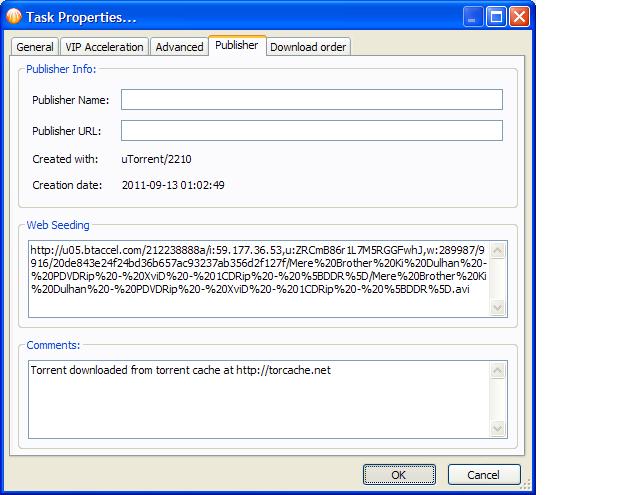
suppose i downloaded a torrent and the seeders are very less and i also found a http link for the download of that file then i can download a part of file from http and another part with bit torrnt peers just like LT seeds.
Actually i found this site http://www.torrific.com this converts torrents to http links for 3 days.
but the problem is that as my internet speed is a bit slow i can not download big torrents within 3 days so my plan is to initially download from this site at high speeds then the left data with bit torrent peers at slow speed
go to “preferrences” then “publisher tab” then “web seeding”
Add as many links as you like, but I’m pretty sure they all have to be in the same directory level. Also understand that torrents don’t download by the file, they download small pieces, so if you’re going to use http only, you’re going to be missing a piece at the beginning and end of each file, but as long as there are bittorrent seeders, they should finish.
However, bittorrent is a far better download protocol then http, especially on slow or unreliable connections. Many http downloads cannot resume if broken.
**** HTTP/FTP links need to be wrapped into URL tags into any post you make on the forum if you want them to be accessible to other users as hyperlinks and not as plain text. Use the Insert Link button on the toolbar of the post editor to do that. ****
i enter the http link and keep clicking “OK” bot nothing happens…
That is NOT true. You keep clicking OK without paying attention. BC tells you that the URL mush end with a slash sign “/” and that’s why it doesn’t allow you to close the dialog box.
However, as far as I know, that works if you have a URL which contains a copy of the torrent contents (i.e. all the files under the same URL).
I’ve never tested it and I don’t know if it works with different URLs for each file. You may try it but you shouldn’t expect it to work mandatorily.
If it doesn’t work you still have the option to download the files just by HTTP. Even if you can’t finish the download through HTTP, you can then take the files, and put them all in the folder of the torrent (replacing the ones created by the torrent task) perform a manual hash-check and if the files are identical then you should be able to more or less pick up from where you left.
Yes, you can use more then one link. I’ve made torrents and webseeded them from an http server, however, you need direct links to the files, not links that you have to check a box, wait for a timer, or whatever, it has to be a link that you click and the file downloads without any help from you.
Yes, as long as they are all in the same folder it should work, as long as the files are 100% identical. there will probably be some duplicate data that needs to be discarded though.
If a torrent has more then one file, they will be in a folder. Its also possible that there is more then one folder, like an entire tv series where each episode is in a separate folder.
i mean that the file is in the main folder only. there is no sub folder. I have tried it many times but after pasting the link in the webseeding box i click on OK but nothing happens the box remains open and do not show any error message.
If you’re using utorrent then you’re in the wrong forum. Please be careful what you type, if you can’t take the time to read your messages before you send them, then we aren’t going to take the time to respond. We donate our time to help members so the very least you can do is give us accurate information.
Lets try this. “right click” on the torrent and select “copy magnet uri”, the post it here using the “insert code snipet” (code tags) option. Then do the same with one or more of your http links and I’ll try it.
Actually I just tried it on a popular torrent from thepiratebay and it worked perfectly. I’ll also add that as soon as I entered the torrent it was instantly ready to download, so someone must have already done the task.
I then opened the torrent in bitcomet and added it as a webseed and it is downloading.
edit: I did some testing and if you run the link as an http task, their server will let you open upto 8 connections concurrently
That is NOT true. You keep clicking OK without paying attention. BC tells you that the URL mush end with a slash sign “/” and that’s why it doesn’t allow you to close the dialog box.
Wiz, I just tried this with an EZTV torrent and it didn’t work when I added a “/” to the end of the link, but it worked fine without the slash. Where did you see bitcomet telling you it had to end with a slash?
ps. this could be a handy way to grab something anonymously. It’s not very fast <200kB/s, but it’s free.