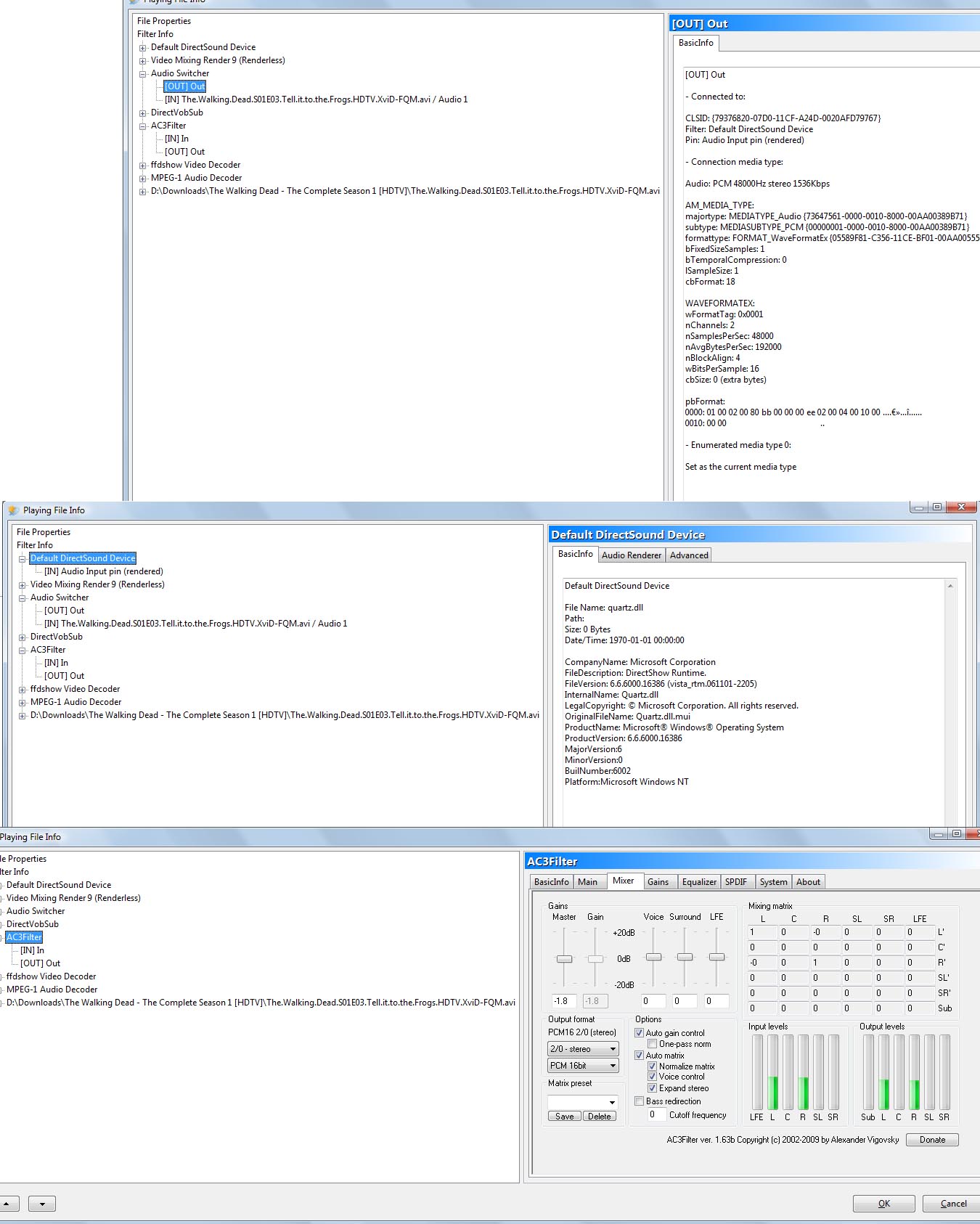
Since you report that it worked fine yesterday, then something must have changed since then. The first step I’d take is to restart your computer and play a video that you have played successfully with MpcStar and see if it works.
If the video NEVER played properly on mpcstar, then it is likely just a matter of installing the proper codec. However if it suddenly stopped playing, but the same video did play correctly before, then there is something wrong on your computer.
I can think of no logical reason for the condition you report, unless there is a setting on your computer that has disabled the sound, and since your English isn’t very good, it would be very difficult to try to understand or diagnose what could be causing this, but if you reinstall the program, it should reset to default settings and hopefully work properly for you.
MPCStar’s core is TigerPlayer, so the configuration is kept in xml files in %appdata%\tigerplayer
If you simply delete that directory, or just delete all of the xml files contained in it, that should wipe out all preferences and revert it to factory.
This is almost certainly a system problem, I’m afraid. You’ll have to look at the sound components of your OS. Basically, you need to figure out what changed on that one day when it stopped working.
Well, it’s fairly simple. You look at what are called “failure modes”, which is to say, “how can this system fail?, and how can it not fail?” For example, an automobile’s brakes can fail for many reasons, but getting motor oil from the engine into the brake lines isn’t one of them. That just isn’t ever going to happen except under truly bizarre circumstances. So you cross that off your list of likely causes of brake failure.
Now since MPCStar/TigerPlayer depends on external filters to decode sound, it’s not likely that they would all fail at once and forever. Rather it’s much more likely that MPCStar finds itself isolated from the correct sound output device.
It’s playing, but to the wrong thing, or to nothing, or it has been muted as an input source. That is something that could happen suddenly and could affect all sound output.
These are all system issues.
Now if you’ll do some exploring under File Info, you’ll notice that MPCStar constructs a “chain” of virtual devices for each file it tries to play. What the chain consists of depends on the file. This is where you can begin to explore what isn’t working, or what’s inappropriate. It’s also where you’ll see error messages or indications. It is also probably where you should have looked first, since the next thing anyone trying to help is going to ask is, “what does File Info say?”
I think what Kluelos is saying is that you reinstalled the entire program with all new configuration files, and you know the program works with your hardware, so the program definitely can work, and your hardware can work with it. You eliminated the possibility of a damaged program or setting, so the only likely cause is something on your system is conflicting with the player.
Something on your system has changed that seems to only effect this program. I’d bet if you reformatted your harddrive, installed windows, then mpcstar, it would work.
Also, Kluelos is stating his “Opinion”, you’re welcome to ignore it if you don’t like it, but keep in mind that he is offering his assistance too you freely, and it is not only possible, but perhaps even likely.
Just thought I’d remind all of you guys posting in this section: AFAIK MPCStar uses internal filters/codecs for decoding both audio and video.
It doesn’t rely on any codecs installed on your system for doing that. This has been my knowledge since the first version I’ve come in contact with, a couple of years ago.
If any of you has reasons to believe otherwise, please share them with us so that we’re all on the same page.
This reminds me of a problem I had with a viop program. After doing some manufacture updates on the machines hardware, it suddenly detected that I had wireless headset capabilities and automatically switched to that as default, even though I own no such headset. It was a nightmare to figure out why my mic and speakers stopped working until I eventually found the “devices” selected for input/output had changed from my internal hardware to “bluetooth”.
I’m wondering if mpcstar has similar output device selection. Yes, I admit I don’t use it. I support bitcomet and cometbird and use them both regularly, I just didn’t feel like switching my media player because I’m quite happy with it.
@ Wiz, your probably right, kluelos can you please comment and either correct us on this, or correct your post to remove the referrence to external codecs.
Going through the MPCStar install process, it did install its “own” filters, but these were not internal filters such as VLC uses. Rather they were (e.g.) a version of ffmpeg, installed on the system. Subsequently installing, say, a codec pack, would overwrite them.
It would probably be more nearly correct to say that MPCStar installs its own codec pack. The filters are not natively a part of TigerPlayer, as I understand it. Tigerplayer expects them to be there, and that part of the MPCStar install just makes sure that they are.
I could be wrong, but this is how I understood what it did. If you watch MPCStar playing something, and look under FileInfo for the chain of devices it creates, you can see that it does indeed use the system filters, and that adjusting those filters adjusts MPCStar’s playback.
This is completely unlike VLC which is entirely independent of the system.
That’s a good indication. You have a signal coming out of the filter and going into the mixer. Now you need to follow the signal forward, seeing what’s coming out of the mixer and where it’s supposed to be going from there.
The reverse chain, starting at the bottom, should end up in a virtual (or actual) sound device that’s in your system. On mine, for example, with nothing but the mainboard sound installed, it ends up in the default DirectSound device. It’s up to DirectSound after that, and DirectSound has its own test routines built in as a part of dxdiag.
That part is probably working fine, if you can hear everything else, so likely the signal is never getting to DirectSound, or is getting muted along the way. Where you check or correct that depends on your OS.
Now you may be able to fix whatever it was that happened, by completely uninstalling MPCStar, rebooting, then reinstalling from scratch, which is at least more straightforward than trying to trace the audio signal, so if you dislike poking into the odd corners of your system, you may want to try that first.
I’m not very clear on how MPCStar installs the filters either.
For instance, in BS.Player you can explicitly see (by using the filter manager) that it installs all its filters locally (independent of those already installed on the system). It installs all the files for the filters in the BS.Player folder and as far as I can tell it uses even separate registry keys as opposed to other installers which dump all the codecs in the System32 folder (good luck trying to find them later in there).
Thus you can often see that the filter manger displays for example 2 installed instances of ffdshow: one installed locally which pertains to BS.Player and another which was previously or subsequently installed by a global installer (such as one of a codec pack) and which will be displayed as installed: system.
This way BS.Player (unless told otherwise) will always use its own versions of the installed filters, which don’t conflict with those installed by other applications on a “system” level.
I was kind of assuming so far that MPCStar uses the same type of smart strategy, but if I come to think about it… I don’t really know, as we never got any official info on this, so far.