Salut!
Daca stii engleza, aici descarci un manual pdf pentru gateway-ul tau.
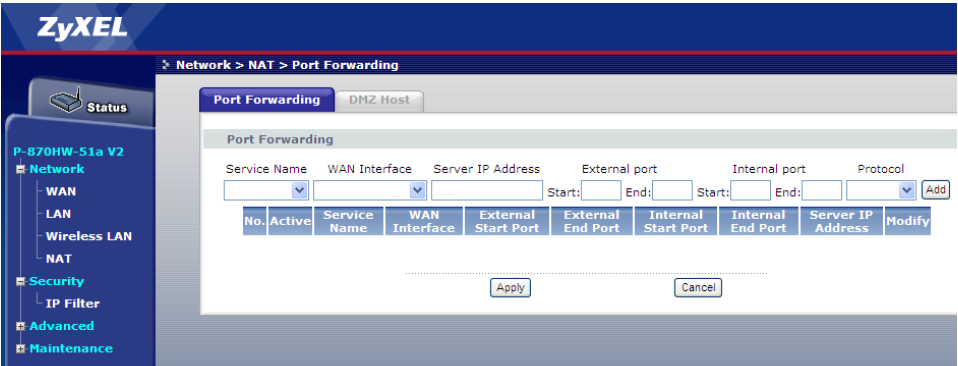
Daca nu, atunci scrie 192.168.1.1 in bara de adrese a browserului tau. Numele si parola ar trebui sa fie amandoua 1234. Ar trebui sa vezi ceva de genul..
/monthly_11_2010/post-53701-12890692437033.png" rel=“”>
Acum scriece vrei (de ex. BitComet) in casuta “service name”, la wan interface alege interfata wan(internet..etc), la server IP address scrii adresa PC-ului tau in LAN (o gasesti daca scrii **ipconfig /all **intr-un command prompt), in toate cele patru casute"…port" scrii un (acelasi de 4 ori) numar de port dintre 49152 si 65535, la “Protocol” alegi TCP si dai click pe add. Daca folosesti reteaua DHT, mai fa o regula exact ca mai sus, doar ca la “Protocol” alegi UDP.
Mergi in BitComet, la “Options”/ Connection si scrii portul ales mai sus in casuta “Listen Port”
Hi!
If you can speak English, download the pdf manual for your gateway from here.
If you don’t, then write 192.168.1.1 in the address bar of your browser. The username and password should be both **1234.**You should see something like…
/monthly_11_2010/post-53701-12890692437033.png" rel=“”>
Now write whatever you want (BitComet for ex.) in the “service name” box, choose your wan iterface in the “WAN interface” box or leave it as it is, write your PC’s LAN address in the “Server IP” box (you can find it if you type ipconfig /all in a command prompt window), write a number between 49152 and 65535 (the same in each) in all four “…port” boxes, choose TCP in the “Protocol” drop-down box and click “Add”. If you use the DHT network, make another rule exactly as above, only this time choose “UDP” in the “Protocol” box.
Go at “Options”/ Connection in BiComet and write the port number you choose above in the “Listen Port” box.