First of all I’d ask for forgiveness if I’m saying this in the wrong place. Now to my point
I’ve tried every guides available but have been a failure in getting that YELLOW light to go away, what is the reason? Well to me it’s mostly due to the reason that all those guides are XP based and I’m using VISTA. And I know that updating these guides are a heck of a work so people like me [ novice ranked ] need one on one instructions.
The yellow light means that unrequested incoming traffic to the listen port is (probably) being blocked by a firewall. The process of opening that listening port in the Windows firewall is not dramatically different under Vista, than it is under XP or, for that matter, Win7.
For third-party firewalls and external firewalls in routers/gateways, XP/Vista/7 makes no difference at all.
Actually if you really want help, you should provide the info we request for submitting a support request. Without that info we can’t accurately tell you where to look for your solution, but I agree with kluelos, the windows version doesn’t matter much.
Yes, I think it’d be better for me to get some actual help rather, try it myself at first and fail and come back again to get some real help. That seems a waste of time. So guys what sort of information’s do I need to give to you so that you could help me get my port forwarded. Do let me know, please.
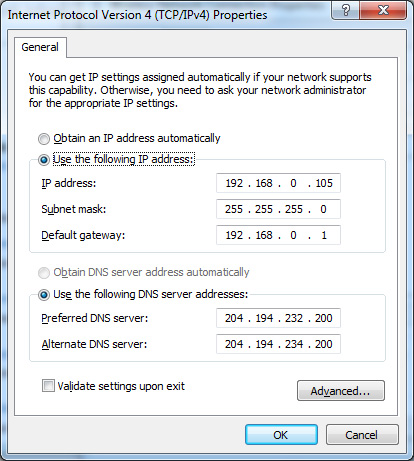
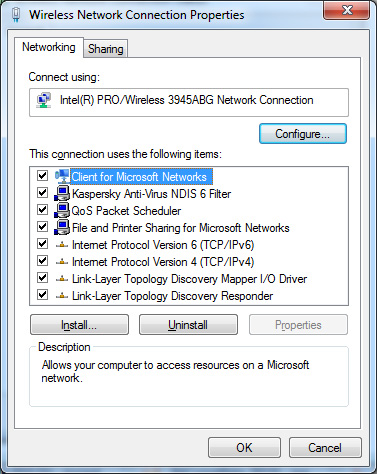
Could you please upload here in a hidden post a screenshot of the NIC properties dialog box in Windows 7, as well as the exact sequence of steps to reach it (via Network Sharing Center or whatever the heck it’s called in Win 7).
I’ll update the Manual Port Forwarding guide with it, as that is the only piece of imagery which may look different in Win 7, in that guide.
That way we’ll get rid of this lazy arse user and the likes of him, and refer them to the guide.
For starters, lets go with the info in the “READ THIS before posting” topic.
And since your in favor of not wasting time, perhaps we should post links to this topic all over the forum, and even in my signature? Oh wait… we already did that…
I’m sorry TUUS, I wasn’t explicit enough. I meant the Properties window for the connection (the one before the dialog you posted) inside which you can see the IPv.4 choice (among others). That’s the one which differs a bit from the one in the guide; the one you posted is identical with the one in the guide so it won’t need updating.
Okay, I know that you think I’ve not read the ’ READ THIS ’ section. I have and even the ’ How to ’ section for " PORT Forwarding " but, I couldn’t make it work.
So now I’m giving you all the info’s that I think is needed for someone to help me on this.( In my previous post I wanted to know from you for certain what is required–that mistake was due to me being lazy. Which lead you to think that I haven’t gone over those topics).
OS = Windows Vista SP1.
BitComet version = 1.27.
Anti virus = Norton 360 Premier. no other Firewall in use.
Now, according to the guide if I’m uncertain about my IP, I’m to go to Start > Accessories > Run.[and type] cmd then on Dos screen I’ll have to type " ipconfig "
to get my IP address ( but I’m getting IPv4 address ) then according to the guide I need to type " ipconfig/all " for the, a)Subnet mask. b)Default Gateway. and c)DNS Servers [here I am getting two DNS Server addresses instead of one shown in the guide ]
After that to configure a static IP what is said in the guide doesn’t match in my PC cause there in my " Internet Protocol Version4(TCP/IPv4) Properties dialog box " I can only in put the IPv4 address and one of the DNS Server as for the Subnet mask and Default Gateway there is nothing.
I hope now I’ve convinced you that I’ve gone over the READ THIS before posting topic.
Port Fowarding process is to allow remote peers to pass through your router, but if the information you provided is accurate, then you don’t have a router, or surely you would have mentioned it.
I’m not familiar with your modem, which could possibly be a both a router and modem, so please refer to your IPv4 address that windows reports. If it begins with 117.18.xxx.x (only partial address shown to protect your privacy), then that is your WAN, or external IP address and you don’t have a router. If your device is also a router, your IPv4 address would most likely be 192.168.xxx.xxx.
If you don’t have a router then you don’t want to set a static IP address unless your ISP allows it and there is no reason to do so when using bitcomet as it will report your current IP to all tracker/peers when your running a task. A static IP is only needed within your LAN (local area network) to make sure your portforward settings don’t change after your router is configured.
ps. I think the only difference is that vista/seven show IPv4 and IPv6 and XP lists only IP or Internet Protocol, so we’d have to describe it as something like…
Internet Protocol (IPv4)
That way users of all windows versions should understand it. Or perhaps adding a footnote.
Internet Protocol (IPv4)*
*Windows XP and prior will display (Internet Protocol), Vista and later windows versions will list both IPv4 and IPv6.
Update: I did a google search on the model number you provided and it appears this might be a cellular modem. If this is true then it is probably operating behind an ISP controlled NAT, meaning you will be unable to accept any remote peer connections.
You can use torrents without an open port but this means that all peer connections must be initiated by you, and when other peers are eager to trade data, they will be unable to reach you until you eventually initiate a connection to them, but the problem is that most peers request trades then when they get as much negotiated as their connection can handle, they switch over to being “choked”, as they are unable to support more trades and on a busy torrent a peer will become choked quickly therefore the odds of you reaching them when they aren’t are unlikely.
Peers also have a limited number of connections they will allow too, so if peer A had a max of 100 connections and currently has 90, it will attempt to add 10 more and the attempt to connect to you will be firewalled, so it will find the desired number elsewhere and then when you try to connect, it won’t accept the connection because it reached it’s limit.
Another issue is two peers who are both in this situation can never connect.
One less then optimal solution that bitcomet used to support is NAT Traversal. With Nat Traversal you can make some remote peer connections. The last version of BitComet to support Nat Traversal was version 102. Your welcome to try that version if you like. There is a link to all versions in my signature.
Yes, its a cellular modem and in its settings there are options to set static IP and two DNS servers one being optional. Here I can also select PAP or CHAP ( I don’t have any idea what these are for)too. Do you think this is where I should work first. If so, what are the information I should ask my service provider to give me.
AS always you’ve been very informative and for that a thank you is but a very little appreciation. Keep up the good work.
Well, to successfully receive remote peer connections, you’d need your isp to provide you a dedicated port that is open to incoming connections, however I don’t believe there are any cellular broadband providers that are willing to do this. To effectively use bitcomet to it’s full potential, you’ll need an internet provider that allows full internet access to your computer, and then your firewall will block all unwanted connections.
Your basically behind a permanent firewall that you cannot control.
If changing your internet provider isn’t an option, then you might want to try Nat Traversal.
All cellular connections are firewalled against unrequested incoming traffic. The soundest reason for this is to prevent anyone from drowning the cell network in advertising, and secondarily to block worms. That isn’t going to go away.
Extensive data transfer isn’t welcome on a cellular network. It uses up bandwidth that can be much more profitably sold to more voice users. You won’t find any cellular providers who are sympathetic to your problem. They’ll simply tell you not to use their network for file transfers, and they won’t help you do it better or faster.
You aren’t going to be able to solve the problem or get an open listen port on most wireless connections (of any type, really, but cellular even more so). Sorry.