Universal Plug and Play(UPnP) is it needed

Hello,

I have noticed in the Summary tab the problem below.

I would like to now where is the problem.

I have a D-Link DIR-868L and I have activated UPNP.

** UPNP**

Universal Plug and Play(UPnP) supports peer-to-peer Plug and Play functionality for network devices.

Enable UPnP IGD : activated

Thanks

George

BitComet 1.38 beta 64bit Statistics log.

Up Time: 1 day 16:56:58

Overall Tasks: Total: 5 / Running: 5

TCP Connections: Established: 50 [MAX:Unlimited] / Half-Open: 74 [MAX:200]

LAN IP: 192.168.2.100

WAN IP: 92.83.243.54

Listen Port of TCP: 13730 (Blocked by Firewall/Router)

Listen Port of UDP: 13730 (Opened in Firewall/Router)

Windows Firewall: Added [TCP added, UDP added]

UPnP NAT port mapping: Failed [uPNP device not found!]

Disk Boost Service: Running

Overall Download Rate: 1366 kB/s [MAX:Unlimited] Max Connection Limits: 50 per task

Overall Upload Rate: 109 kB/s [MAX:100] LT Seeding: 0 kB/s [MAX:3] All BT Upload Slots: 33

Memory Usage: Working Set: 952.69 MB, Commit Size: 1.05 GB

Free Memory: Phys: 3.01 GB (Min to keep: 50 MB), Pagefile: 3.24 GB, Virtual: 131,070 GB

Disk Cache Size: 908 MB (Min: 6 MB, Max: 2048 MB)

Disk Read Statistics: Request: 916596 (freq: 6.0/s), Actual Disk Read: 18097 (freq: 0.0/s), Hit Ratio: 98.0%

Disk Write Statistics: Request: 13113126 (freq: 71.9/s), Actual Disk Write: 24193 (freq: 0.0/s), Hit Ratio: 99.8%

Total Downloaded: 273.75 GB (this session: 217.66 GB)

Total Uploaded: 18.82 GB (this session: 15.36 GB)

BitComet.jpg

DLink0.jpg

DLink1.jpg

DLink2.jpg

DLink5.jpg

FirewallWindows10.jpg

Hi,

Meanwhile I have solved it but I still have a question.

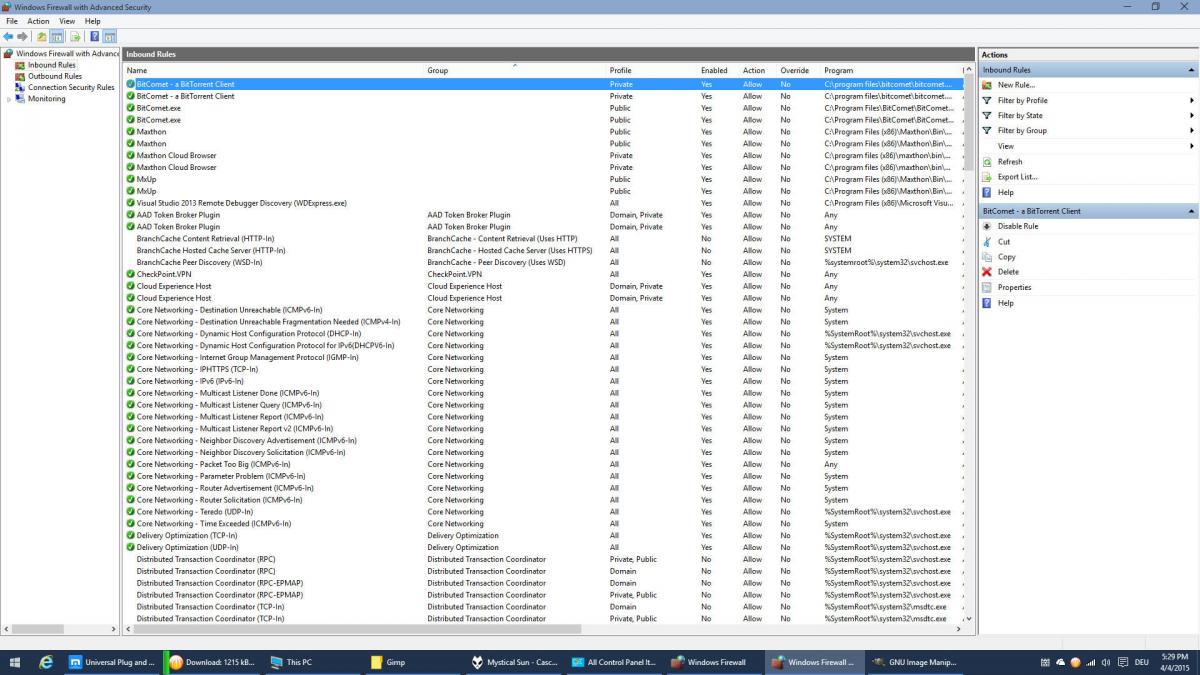
Should I have in Windows Firewall → Advanced Settings → Inbound Rules → BitComet.exe → Properties → Advanced in Edge Traversal put to Allow Edge Traversal ?

Thanks,

George

Woah!!!.. I am sooo lost on this one (eyes glazing over) :blink:

Windows firewall exception is added automatically by BitComet

Hello,

I solved the problem with the UPNP, see the log below.

The problem I have is I have Yellow light:

/monthly_04_2015/post-159157-0-69594500-1428049298.jpg" rel=“”>

I have a Huawey 658 router with UPNP enabled connected to the ISP on VDSL. I tried to connect dirrectly and all is detected UPNP and I have a Green light with WAN and the adress.

I use a D-Link 868L connected on LAN 0 on the Huawey modem, and I connect on the 5Ghz network. All is auto, DHCP is on, UPNP active.

The settings from the log are with the D-Link connection.

But I still have that yellow that the port is blocked, slow download.

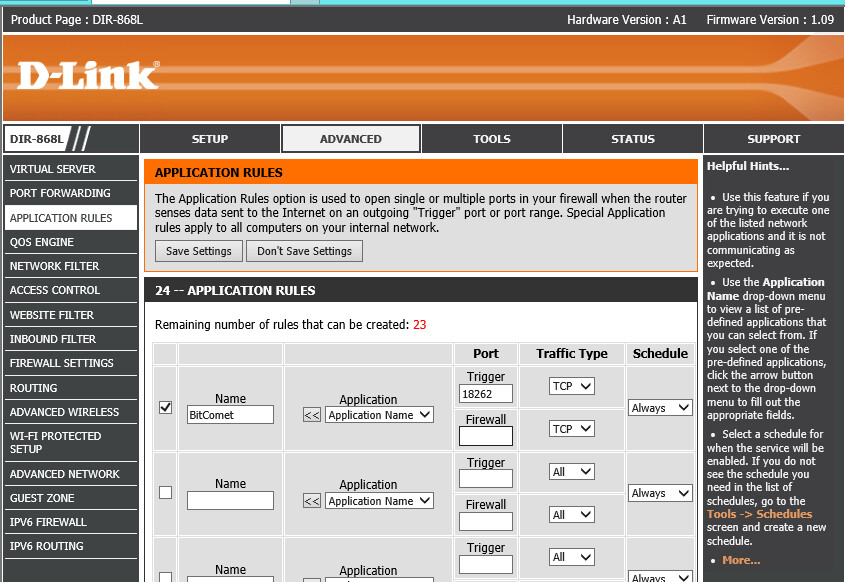
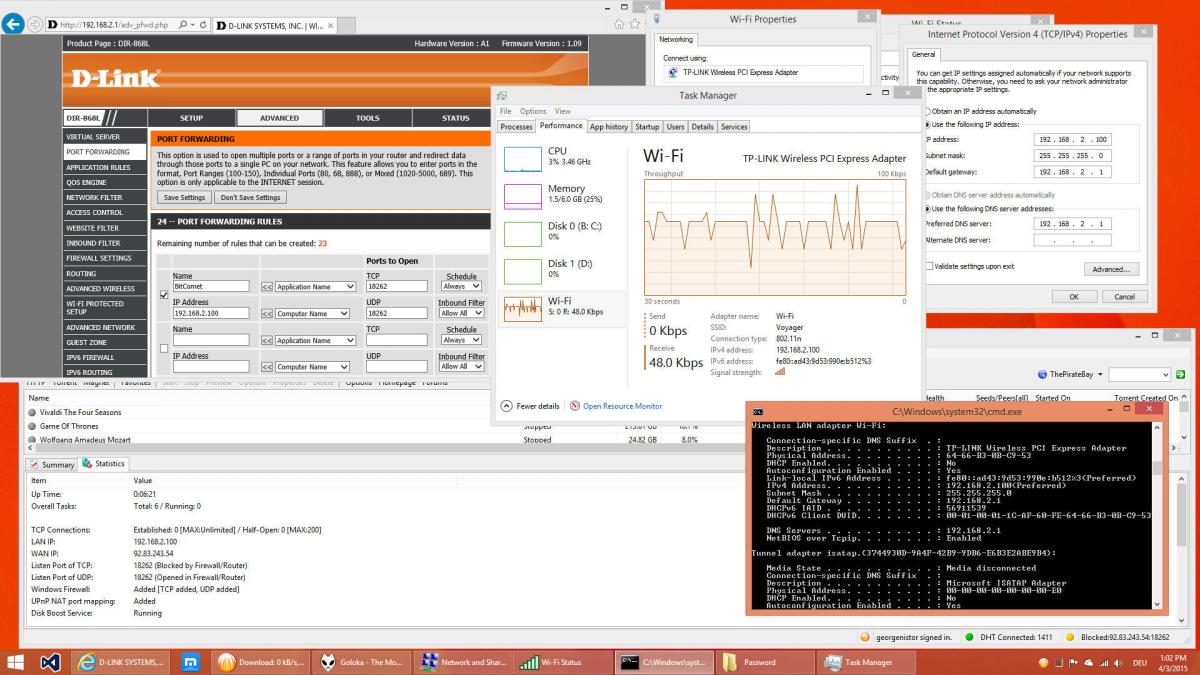
I tried to add the PORT and my IP in the advanced settings in the Virtual Server, Port Forwarding and Application rules. All have allow on my fix port and my IP is put from the router list.

The application settings does not require an ip, only the PORT specified.

Can you help and tell me what I have to configure more.

I folowed also http://wiki.bitcomet.com/add_port_mapping_in_nat_router#bitcomet_upnp_auto_port_mapping

and done all for UPNP port mapping.

Thanks,

George

Up Time: 0:42:30

Overall Tasks: Total: 6 / Running: 6

TCP Connections: Established: 92 [MAX:Unlimited] / Half-Open: 35 [MAX:200]

LAN IP: 192.168.2.100

WAN IP: 92.83.243.54

Listen Port of TCP: 18262 (Blocked by Firewall/Router)

Listen Port of UDP: 18262 (Opened in Firewall/Router)

Windows Firewall: Added [TCP added, UDP added]

UPnP NAT port mapping: Added

Disk Boost Service: Running

Overall Download Rate: 1566 kB/s [MAX:Unlimited] Max Connection Limits: 50 per task

Overall Upload Rate: 110 kB/s [MAX:100] LT Seeding: 0 kB/s [MAX:3] All BT Upload Slots: 35

Memory Usage: Working Set: 1.12 GB, Commit Size: 1.23 GB

Free Memory: Phys: 3.14 GB (Min to keep: 50 MB), Pagefile: 3.55 GB, Virtual: 131,070 GB

Disk Cache Size: 1.13 GB (Min: 6 MB, Max: 1500 MB)

Disk Read Statistics: Request: 15026 (freq: 6.1/s), Actual Disk Read: 406 (freq: 0.1/s), Hit Ratio: 97.2%

Disk Write Statistics: Request: 211894 (freq: 87.8/s), Actual Disk Write: 401 (freq: 0.1/s), Hit Ratio: 99.8%

Total Downloaded: 65.63 GB (this session: 3.52 GB)

Total Uploaded: 3.52 GB (this session: 263.43 MB)

/monthly_04_2015/post-159157-0-75677200-1428050442.jpg" rel=“”>

/monthly_04_2015/post-159157-0-93649000-1428050457.jpg" rel=“”>

I have deleted the rules from the Virtual Server and Application rules and I have added only Port Forwarding as in the link

http://portforward.c…8L/BitComet.htm

Still the port is blocked.

I use DHCP on the ruter whch gives me prefered (always) 192.168.2.100

/monthly_04_2015/post-159157-0-24878200-1428054229.jpg" rel=“”>

Hello,

I have tries all the wikis above, I have set also the IP as static, (even it is not absolutely necesary), and still I have the PORT blocked.

Please give me any tip, advice.

Thanks,

George

/monthly_04_2015/post-159157-0-27497600-1428056298.jpg" rel=“”>

go to Windows Firewall setting and tick BitComet’s both “Home/Work (Private)” and “Public” checkboxes.

It sounds like you have two routers. Look at the section regarding cascading routers on the bitcomet wiki page. The first router which you refer to as the modem would need to either be disabled so it works only as a modem, or forwarded not to your computer, but to the second routers IP address, which you’d then forward to your computer. The article will explain it much better than I can in a single forum post. If you cannot find it let me know and I’ll look for it for you.

Hi all,

That one with the Rule for both Private and Public was solved automaticaly by the Windows Firewall.

I know that the first VDSL router Huawey should be put as bridge but till now I was not able to put it as Bridge (without PPPoE), as Bridge IP.

I would ask to the TELEKOM is they have something else as modem because I need it to be configured in BRIDGE mode.

The second solution I don’t like it so much.

As speed it works fast enought, it is similar with uTorrent without legacy connection. You miss a lot of peers but it works fine.

Now the question is:

The UPNP configuration is enought for the BitComet to function properly? I ask it because this one I was able to solve.

/monthly_04_2015/post-159157-0-73000600-1428158363.jpg" rel=“”>

Thanks,

George