This looks like the best place to talk about what DHT is and how it works. In order to keep it simple, let’s use the example of a telephone directory. That should be familar to almost everybody Here’s part of our directory:
Azureus, Adrian
123 Minor St, Pougkeepsie, IL 54321
101-202-3456
Bitcomet, Bob
27 TCP Highway #404, Chitling Switch, TX 65432
555-666-7777
Utorrent, Uther
P.O. Box 155, Aberrent, AZ 88888
999-876-5432
And so forth. If it’s a printed directory, it’s something everyone has seen and used. Let’s make it a database instead. Now it’s one or more tables (lists, basically) of data in a computer server. The advantage of a database is that we can give it commands like “show me everybody who lives in Arizona”, or “I’ve added some people to the list, so re-sort it”
Now think big. Lots of data about lots of people. Spouse’s name, kids’ names, pet’s name, family doctor, shoe sizes, and many other things. For a whole LOT of people.
A database would be the only sane way to manage such a large list. But if you’re going to do that, you usually need a honkin’ big, powerful and expensive computer to run that database on. You also want it to have all sorts of protective, redundant and backup features so you don’t ever lose the list and it’s always available.
But there is an alternative. Instead of one huge, powerful computer, let’s spread this same list over a whole bunch of small, average computers. The way we’ll do that is to make a code based onf each entry.
We’ll take one entry and use a mathematical function to create a very long unique number out of it. This is called a “hash”. Then we’ll assemble all of these hashes into a single table, along with the records they point to. This is our “Hash table”.
Now we’ll cut the table into small pieces, and give every computer on our network a part of the table. So now it’s a Distributed Hash Table, or DHT.
If you want to look someone up, you take the information you’ve got, such as the name, and compute the hash for that. Then you go into the network and look for the node that handles hashes of that particular range, find the one computer that has that particular entry, and retrieve the information from it.
How do you find that particular node? You ask your neighbors. (You’re in the network too, so you’ve got a small chunk of the table that you’re responsible for too.) You ask another known node (which you discovered when you joined the network), and he points you to another node, which points you to another, and so on until you get to what you’re looking for.
Suppose your part of the table is all the people whose last name begins with “T”. You’re looking for somebody whose last name begins with “H”. Since you yourself are “T”, you know who’s got “S” and who’s got “U”, because they’re your neighbors in this network. If you’ve got some idea of structure, you’ll go towards U, which will point you to V, who will point you to W, then X, Y, Z, A, B, C and so on till you get to the “H” you’re looking for.
If you don’t know the structure, you could go in the other direction, but you try to chose the most efficient if you can. But hashes are numbers (admittedly very LARGE numbers), and you can see how this is easier with numbers.
Instead of addresses and other phone-book information, we’re looking for bittorrent peers. The hash we’re searching for is that of the torrent we’re trying to download. When we locate the correct node, we can get from it a list of all the other peers who are transferring this torrent and who are in the DHT network. We can compare that list to the list of peers that we got from the tracker (if we’ve got one), eliminate any duplicates, and add into our peer list any that are left over. Poof, we’ve got more peers! And we did it without the tracker.
Now DHT goes to sleep for 20 minutes, then it wakes up and queries again, to see if any more peers have joined. If they have, they get added, otherwise it’s back to sleep again.
This whole thing is the guts of a “distributed database”, which is a cool concept. Much more difficult to do than to describe, of course, and there are terrible reliablility/availability problems, but they’re being worked out. The detailed scheme that BitComet uses is based on a scheme called “Kademlia”, which was invented by a couple of grad students. This is a subset of it.
Now since this thing does not talk to the tracker, and doesn’t transfer torrent data, you can fit it right into the existing bittorrent structure without changing that structure at all. This is called an “overlay”. DHT can be added to a bittorrent client and it will still work just fine with other clients that don’t have DHT, because nothing has changed in the structure of communication. Those other clients simply wont’ be part of the DHT network, or even aware of its existence. They also won’t, naturally, be found by that network because they’re not part of it. These clients have to be found via the tracker. The only point of contact between DHT and bittorrent is when additional peers get added into the connection pool, and that happens internally to the client.
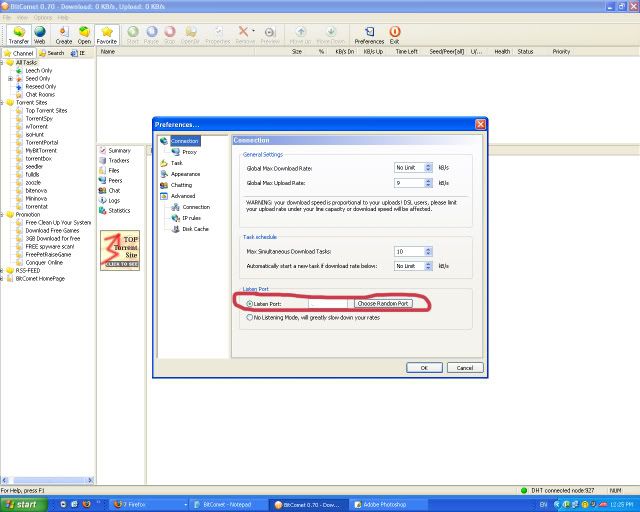
In this particular instance, all of the DHT messages we need to send and receive do not require two-way communication. They are like monologues, not conversations. That means that we can use the UDP protocol, which is older and simpler than TCP protocol and doesn’t require the overhead of two-way communication.We can set that right down onto our existing listen port, and since it’s a different protocol, they won’t interfere with each other. The only catch is that we have to open the listen port for UDP in addition to opening it for TCP traffic. Fortunately, that’s very simple to do.
Torrents can optionally disable DHT for the particular torrent. Private torrent sites want you to do that in order to keep their torrents private. However, it is the torrent, at the time it’s created, that controls this. All that the tracker can do is refuse to accept torrents which haven’t disabled DHT. It can’t change them, because you can’t change a torrent after creation. (That means you also can’t add a virus to it, so that’s a good thing.) If you change a torrent, the hashes won’t match any more, and the whole chain will break down.
You can see from all this that DHT is a nice extra, and someday will be used for completely trackerless torrents that can be distributed from, say, your weblog, without needing to set up a tracker. That’s really what it was created for. But you can also see that you don’t NEED to have DHT for normal tracked torrents, and you’ll probably get plenty of peers even without DHT.
 or
or 

 A red cross appears next to my torrent currently being downloaded in BitComet. What is it?
 or
or  icons next to my torrent’s name.
 means that the tracker(s) you’re connecting to has timed out or is otherwise currently unavailable; or that the torrent is trackerless.
 means that you’ve successfully exchanged metafiles with the tracker, and BitComet is currently attempting to connect to Peers/Seeders for you, but has not done so yet. This icon usually changes to the green down-arrow very quickly.
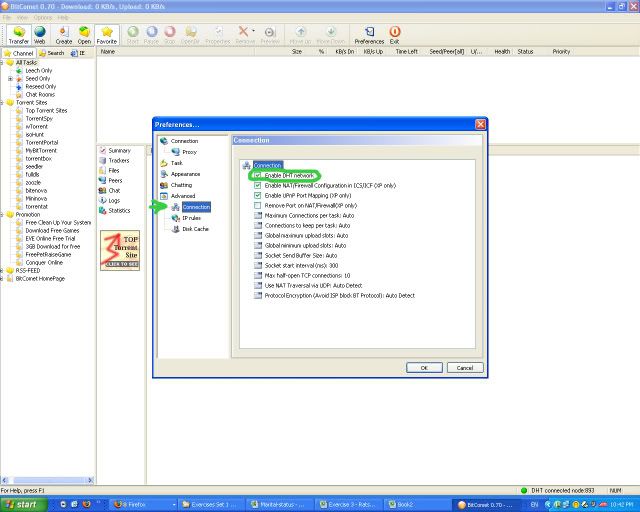
 → Try enabling your DHT network as well, by right clicking on that torrent, Click Properties, Advanced, Under Task Settings → Click the checkbox “Enable Public DHT network”.
 → Try enabling your DHT network [instructions above]. In normal torrent downloads, you should see this icon only for a split second, it should then change to the green arrow facing downwards. If you continually see this icon for more than an hour or so, it’s more than likely that the torrent no longer has peers/seeders, OR if you’re suddenly seeing this icon appear during your torrent download, it means that no peer has your remaining data (Check your peers tab, and see whether other users also have the same download percentage as you do). This icon can also occur if your internet connection has terminated for some reason.