Hi, when setting virus scan parameters, I do not find how to reference to the current folder, files just finished in bicomet. They are not in the wiki.
Hi, when setting virus scan parameters, I do not find how to reference to the current folder, files just finished in bicomet. They are not in the wiki.
You need to kmnow the path to your antivirus program and set that in the options
However, if you are downloading apps with keygens and/or 'cracks' the a/v will probably wipe them out
I mean the path to the file just finished downloading in bitcomet. I need to reference it in the parameter.
Pick any downloaded file, right click and lok in ‘properties’. That will show where the download folder is.
However, the parameter BitComet options is looking for isn't where the downloaded file is (the program knows that) but the path to the A/V .exe file
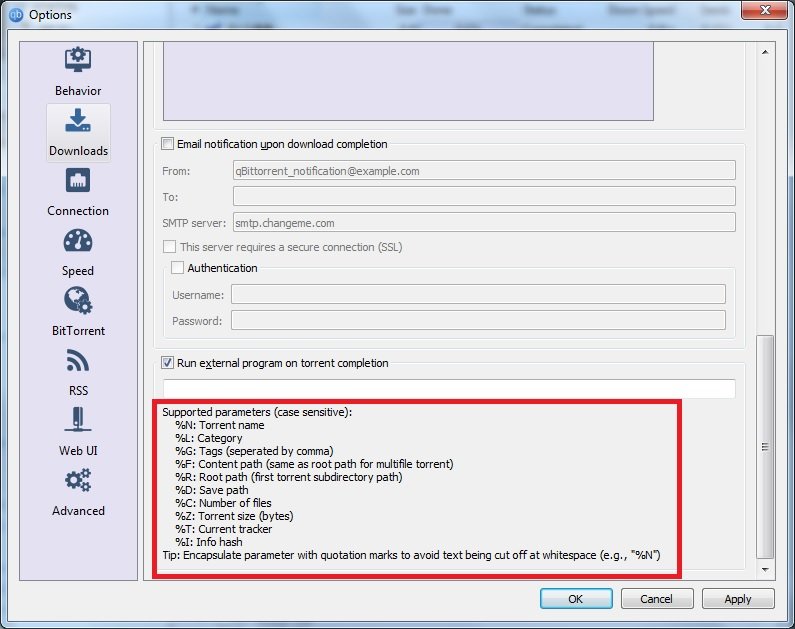
I also want to know does bitcomet has any parameter exposed like in qbittorrent
/monthly_2018_07/parameter.jpg.e270855669f22e083d5a653860d83f49.jpg" class=“ipsAttachLink ipsAttachLink_image”>
I’ll be honest and say that I can’t see any use for most of those options
If parameter like path is provided, I can automate some postprocessing job done to the finished files. It would be great if bitcomet can expose some paramters.
	On 7/28/2018 at 11:03 PM, Rhubarb said:


		I'll be honest and say that I can't see any use for most of those options


At least, the parameter which locates downloaded file, folder is needed so much, If bitcomt doesn't provide these parameters, then why virus scan option is provided? Even anyone who doesn't know how to reverse engineering can't use the virus scan feature?

Is there any reason hiding the parameters Bitcomet provides?

Everytime I search about virus scan feature of Bitcomet on google, I failed to find any information, also there is no information in official Bitcomet Wiki, this is nonsense.
You simply set the path to the anti-virus app and, so long as it knows where the bitcomet download folder is, it takes care of it by itself